
This chapter explains how to configure the REST connection in the SIGNATUS settings, under the section “Download using REST channel”.
2.1 Login with basic or cookies authentication #
Login and Authentication #
Login is required to enable cookie-based authentication.
- Without login URL configured:
- If login URL is not configured, Basic Authentication is used instead.
- In this case, the username and password are sent in the HTTP Authorization header with each request.
- The credentials are used directly for business-related operations (e.g., list of documents, document download, document upload).
- With login URL configured:
- The login operation is the first step in communication with the server.
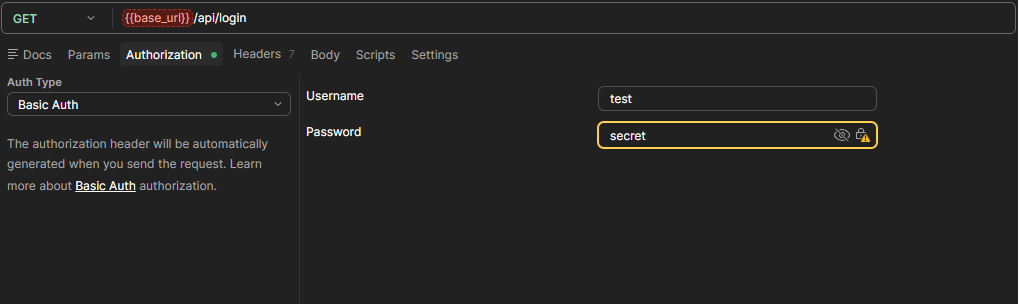
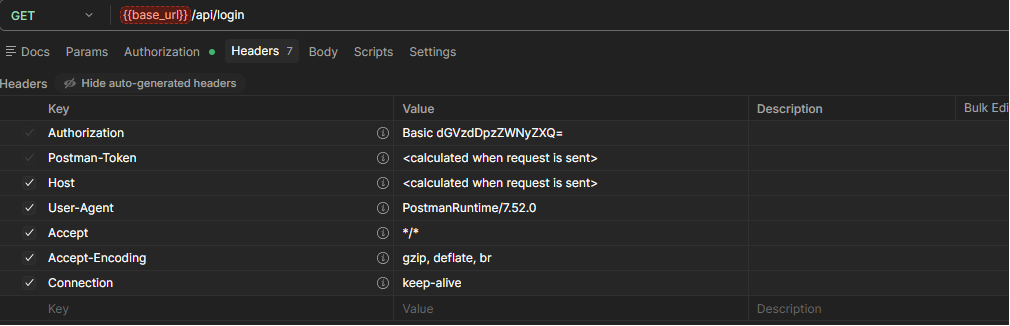
- The request includes the username and password in the Authorization header.
- The server responds with a cookie.
- This cookie is then sent in the header of all subsequent requests.
- Authentication Cookie Name has to be „JSESSIONID“
Service specification #
| Url | Configured in “REST login URL” setting Example: https://<host name>/<context>/api/login |
| Method | GET |
| Authentication | Autorization – Basic {username:password} in base64. username and password (values configured in the settings or entered by the user when prompted) |
| Response type | application/json |
HTTP- Click to view HTTP code snippet
GET /api/login HTTP/1.1
Host: localhost:8080
Authorization: Basic dGFibGV0OnRhQmxldCMyMg==Response description #
| Status code | Description |
| 200 OK | Authentication success |
| 401 Unauthorized | Invalid credentials |
| 500 Internal Server Error | Server processing error |
Postman example #
2.3 List of documents #
List is used to browse the download channel. It returns a list of documents available for download
Service specification #
| Url | Configured in “REST list URL” setting (for the root folder) or returned in the “url” property (for a subfolder) Example: https://<host name>/<context>/rest/list/flat |
| Method | GET |
| Authentication | Session Cookie Authentication or Autorization – Basic {username:password} in base64. |
| Response type | application/json |
HTTP- Click to view HTTP code snippet
GET /rest/list/flat HTTP/1.1
Host: localhost:8080
Cookie: JSESSIONID=A62DFDAAD0D55FC9B0A0124DC4B95A24Response description #
| Status code | Description |
| 200 OK | Document list |
| 401 Unauthorized | When user is not authenticated |
| 403 Forbidden | When user lacks required permissions |
| 500 Internal Server Error | Server processing error |
The List request returns a JSON object from the server.
Based on the data in this object, the SIGNATUS application generates a list of documents.
The JSON response includes the following properties:
| filename | name of the item to be displayed to the user |
| id | unique identification of the document (used to send acknowledgments) |
| url | link to download document |
| other | any other custom properties that will form the document metadata and will be sent back to the server when the document is uploaded after signing |
Example response showing a list of documents:
[
    {
        "date": 1777459020318,
        "filename": "Test-272.pdf",
        "id": "Rb7VgVYshBBy8QMLDMT5a4_3GRW1AZdjQb08R9a5AvqRfuZt_kY0Xv6qbvXuqfob9W_H8LMD79SAVqkx0XRozw",
        "modification": "2026-04-29 12:37:00",
        "reuploadState": "signed",
        "state": "tosign",
        "url": "http://localhost:8080/rest/document/Rb7VgVYshBBy8QMLDMT5a4_3GRW1AZdjQb08R9a5AvqRfuZt_kY0Xv6qbvXuqfob9W_H8LMD79SAVqkx0XRozw",
        "number": "528",
        "name": "Kerry Tremblay",
        "box": "Inbox",
        "group": "tablet",
        "sid": "Cole Group"
    }
]
2.4 Download document #
Download is triggered when the user selects a document from the list.
The SIGNATUS application then retrieves the PDF file using the URL provided in the JSON response of the List request.
Service specification #
| Url | Value of the “url” property from the list of documents Example: https://<host name>/<context>/rest/document/<document id> |
| Method | GET |
| Authentication | Session Cookie Authentication or Autorization – Basic {username:password} in base64. |
| Response type | application/pdf |
HTTP- Click to view HTTP code snippet
GET /rest/document/Rb7VgVYshBBy8QMLDMT5a4_3GRW1AZdjQb08R9a5AvqRfuZt_kY0Xv6qbvXuqfob9W_H8LMD79SAVqkx0XRozw HTTP/1.1
Host: localhost:8080
Cookie: JSESSIONID=A62DFDAAD0D55FC9B0A0124DC4B95A24Response description #
| Status code | Description |
| 200 OK | Binary stream with the content of the respective document |
| 401 Unauthorized | When user is not authenticated |
| 403 Forbidden | When user lacks required permissions |
| 404 Not Found | If the document with the specified id does not exist. |
| 500 Internal Server Error | Server processing error |
2.5 Acknowledge download – Change document state #
Acknowledge is used to notify the server about important events related to a document.
For example, after a document has been successfully downloaded to a device, the application sends an acknowledge message to the server.
This allows the server to update the document’s state (e.g., mark it as “in progress”) and prevent it from being offered for download to other users.
Service specification #
| Url | Configured in “REST ACK URL” setting Example: https://<host name>/<context>/rest/state |
| Method | POST |
| Authentication | Session Cookie Authentication or Autorization – Basic {username:password} in base64. |
| Content Type | multipart/form-data |
| Response type | application/json |
Request description #
Request parameters:
| Key | Type | Description |
| id | text | unique identification of the document |
| state | text | – download = the document has been downloaded – open = the document has been opened on the tablet – cancel = signing of the document has been cancelled |
HTTP- Click to view HTTP code snippet
POST /rest/state HTTP/1.1
Host: localhost:8080
Cookie: JSESSIONID=A62DFDAAD0D55FC9B0A0124DC4B95A24
Content-Length: 307
Content-Type: multipart/form-data; boundary=----WebKitFormBoundary7MA4YWxkTrZu0gW

------WebKitFormBoundary7MA4YWxkTrZu0gW
Content-Disposition: form-data; name="id"

Rb7VgVYshBBy8QMLDMT5a4_3GRW1AZdjQb08R9a5AvqRfuZt_kY0Xv6qbvXuqfob9W_H8LMD79SAVqkx0XRozw
------WebKitFormBoundary7MA4YWxkTrZu0gW
Content-Disposition: form-data; name="state"

download
------WebKitFormBoundary7MA4YWxkTrZu0gW--
Response description #
| Status code | Description |
| 200 OK | Acknowledge success |
| 401 Unauthorized | When user is not authenticated |
| 403 Forbidden | When user lacks required permissions |
| 404 Not Found | If the document with the specified id does not exist. |
| 409 Conflict | If the state is not allowed |
| 500 Internal Server Error | Server processing error |
Success response example :
{
    "message": "msg.document.move.success",
    "result": "Rb7VgVYshBBy8QMLDMT5a4_3GRW1AZdjQb08R9a5AvqRfuZt_kY0Xv6qbvXuqfob9W_H8LMD79SAVqkx0XRozw"
}Error response example :
{
    "message": "err.not.found",
    "value": "Rb7VgVYshBBy8QMLDMT5a4_3GRW1AZdjQb08R9a5AvqRfuZt_kY0Xv6qbvXuqfob9W_H8LMD79SAVqkx0XRozw33"
}