
Skip to content

  • Documentation
    • Web App – OKdokument API
    • Signatus Mobile App
  • Contact Us

1. API concept

  • Overview
  • 1.1 Supported web browsers
  • 1.2 Supported languages
  • 1.3 How to prepare document for signature
  • 1.4 How to use acrofields
  • 1.5 How to use pre-defined signature fields
  • 1.6 Document states
  • 1.7 Storing and deleting documents
  • 1.8 OKDokument API call list
  • 1.9 QR code
  • 1.10 Email and SMS
  • 1.11 Dictionary

2. Core API services

  • 2.1 Authorization
  • 2.2 Create signature request
  • 2.3 Open document
  • 2.4 Information about signing completion
  • 2.5 Result URL
  • 2.6 Download document
  • 2.7 Delete document

3. Additional API services

  • 3.1 List of the documents
  • 3.2 Document Info
  • 3.3 Update Signature Request ID
  • 3.4 Delete Signature Request ID
  • 3.5 Signature request Counter
  • 3.6 Upload document

4. Use cases

  • Overview
  • 4.1 Example 1: Simple one-round signing
  • 4.2 Example 2: One-round signing with redirect url
  • 4.3 Example 3: One-round signing with send info
  • 4.4 Example 4: Multi-Round Signing

5. Configuration of the signing process

  • Overview
  • 5.1 One-round signing with simple PDF
  • 5.2 Multi-round signing with simple PDF
  • 5.3  One-round signing with PDF with tags
  • 5.4 Multi-round signing with PDF with tags
  • 5.5 One-round signing with PDF with signature acrofields
  • 5.6 Multi-round signing with PDF with signature acrofields
  • 5.7 Accessing document after inserting OTP
  • 5.8 Sign document with OTP
  • 5.9 Email
  • 5.10 QR code

6. Examples

  • Postman examples
View Categories
  • Home
  • Documentation
  • Web App - OKdokument API
  • 4. Use cases
  • 4.2 Example 2: One-round signing with redirect url

4.2 Example 2: One-round signing with redirect url

Description

Compared to the previous example, added to the integration is:

  • Result url
  • Delete document service

What is improved compared to the Example 1 is that information about the document being signed is transferred to the Portal. The Portal now knows that the document was signed

and the status has changed and therefore can determine exactly when the document was signed.

In this example, we assume that the Portal has prepared web page where user is redirected after signing the document.

How it works

We are again sending a PDF through the Create signature Request service, that does not have precisely defined signature places. In addition, a resulturl parameter is defined in the service, which is called when the document is signed and closed.

The response, as in Example 1, is the url of the document for signature that the signer opens in a web browser.

After signing and confirming the signature (or after canceling the signing), the signer is redirected to the resulturl defined when calling the Create signature Request service. When

redirecting the signer to the resulturl, OKdokument transmits information about the signing statue (not the state of the document):

  • Success – the signer has confirmed the document
  • Cancel – the signer did not sign the document (pressed the cancel button)

The signed document can be downloaded and saved in the Portal using the Download document service.

After downloading the signed document, the document is deleted by calling the Delete document service.
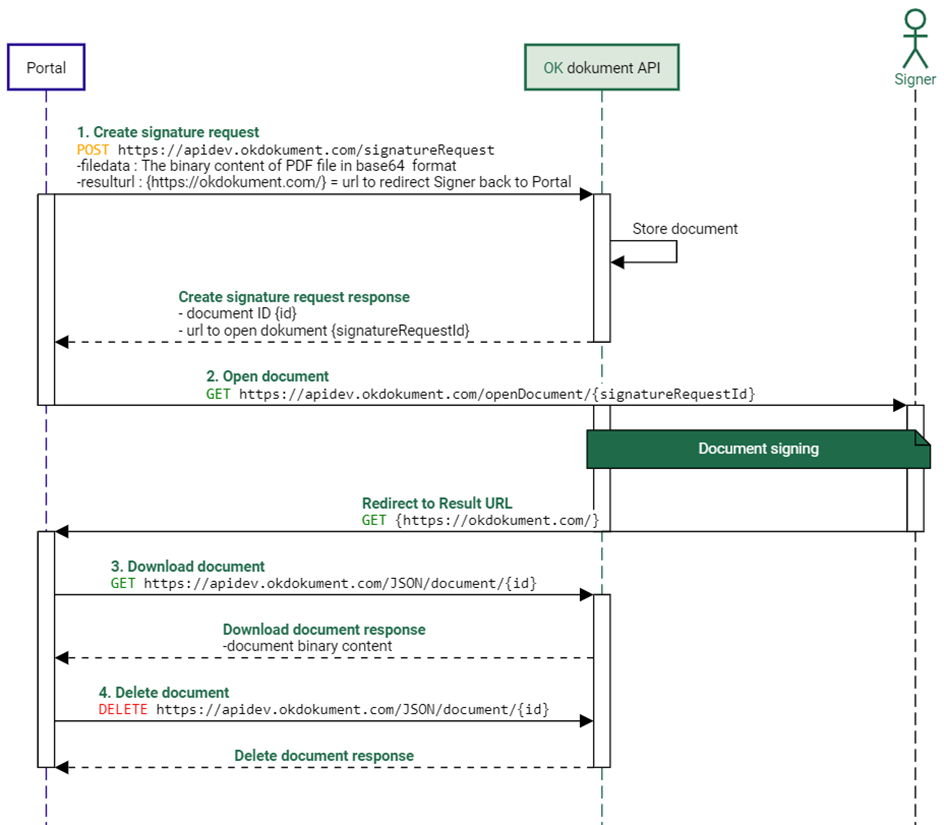
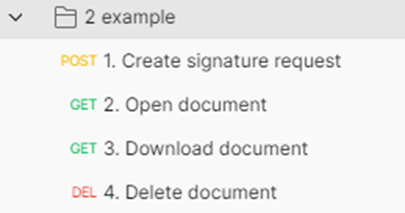
Figure 16 Single round signature with url redirect
Figure 17 Postman example 2

Updated on 25/07/2024
4.1 Example 1: Simple one-round signing4.3 Example 3: One-round signing with send info
  • Documentation
    • Web App – OKdokument API
    • Signatus Mobile App
  • Contact Us
Proudly powered by WordPress