
Skip to content

  • Documentation
    • Web App – OKdokument API
    • Signatus Mobile App
  • Contact Us

1. API concept

  • Overview
  • 1.1 Supported web browsers
  • 1.2 Supported languages
  • 1.3 How to prepare document for signature
  • 1.4 How to use acrofields
  • 1.5 How to use pre-defined signature fields
  • 1.6 Document states
  • 1.7 Storing and deleting documents
  • 1.8 OKDokument API call list
  • 1.9 QR code
  • 1.10 Email and SMS
  • 1.11 Dictionary

2. Core API services

  • 2.1 Authorization
  • 2.2 Create signature request
  • 2.3 Open document
  • 2.4 Information about signing completion
  • 2.5 Result URL
  • 2.6 Download document
  • 2.7 Delete document

3. Additional API services

  • 3.1 List of the documents
  • 3.2 Document Info
  • 3.3 Update Signature Request ID
  • 3.4 Delete Signature Request ID
  • 3.5 Signature request Counter
  • 3.6 Upload document

4. Use cases

  • Overview
  • 4.1 Example 1: Simple one-round signing
  • 4.2 Example 2: One-round signing with redirect url
  • 4.3 Example 3: One-round signing with send info
  • 4.4 Example 4: Multi-Round Signing

5. Configuration of the signing process

  • Overview
  • 5.1 One-round signing with simple PDF
  • 5.2 Multi-round signing with simple PDF
  • 5.3  One-round signing with PDF with tags
  • 5.4 Multi-round signing with PDF with tags
  • 5.5 One-round signing with PDF with signature acrofields
  • 5.6 Multi-round signing with PDF with signature acrofields
  • 5.7 Accessing document after inserting OTP
  • 5.8 Sign document with OTP
  • 5.9 Email
  • 5.10 QR code

6. Examples

  • Postman examples
View Categories
  • Home
  • Documentation
  • Web App - OKdokument API
  • 4. Use cases
  • 4.3 Example 3: One-round signing with send info

4.3 Example 3: One-round signing with send info

Description

In this example, we will expand the options for setting up the signature Request service and use the send info service. The send info service is used for backed to backend communication between the OKdokument API and Portal to exchange document state

information. This service can be used alone or in conjunction with the result url as described below.

The prerequisite is the implementation of the send info service on the Portal side.

How it works

In this example, the input is a PDF document that already contains signature field tags, so Create signature Request is extended by:

  • State: tags, OKdokument API searches through the PDF document and inserts a signature field where it finds a unique text string (tag)
  • signAnywhere = disabled, as the document contains a signature field and the functionality of the “anywhere” signature should be disabled

In the Create signature Request configuration, we also added a value for sendInfoUrl, which is called by the OKdokument API after signing (or canceling) the document.

At the moment when OKdokument API scans the tags and inserts the necessary signature acrofields, it returns to the Portal: document ID and a unique url for opening the document for signature

After signing and confirming the document (or cancelling the signing) OKdokument API:

  1. Redirects the user to the result url with the given result (success, close)
  2. Addresses the info service of the portal and with the given state of the document (signed, canceled)

The signed document can be downloaded and saved in the Portal using the Download document service.

After downloading the signed document, the document is deleted by calling the Delete document service.
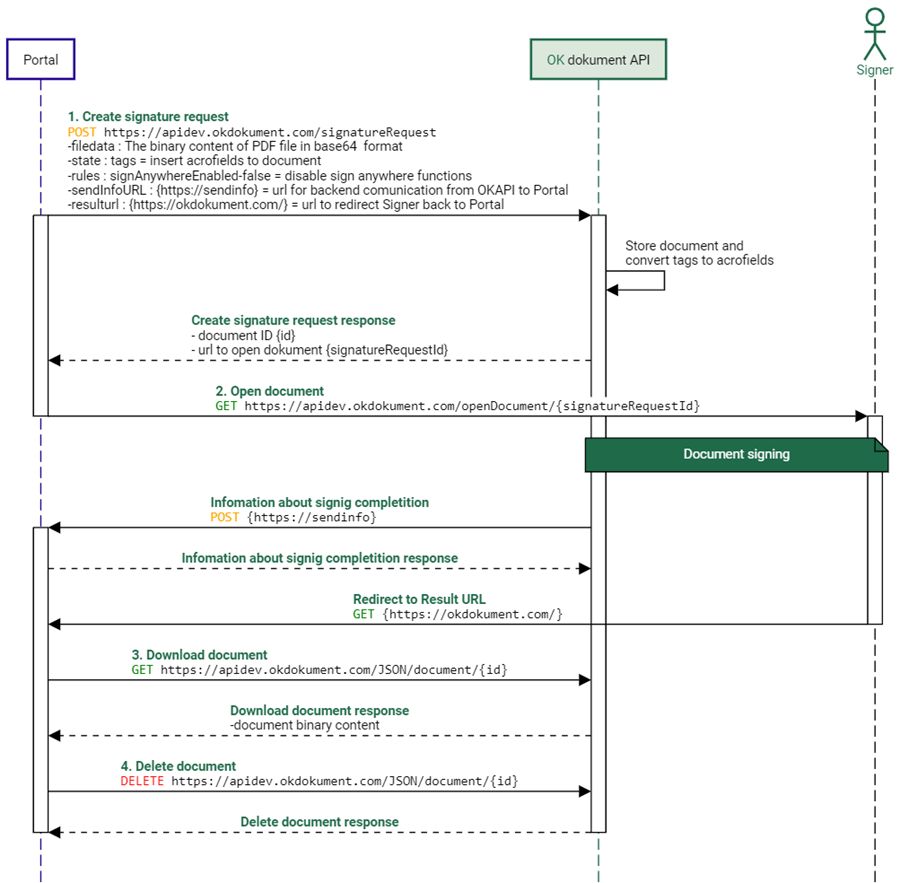
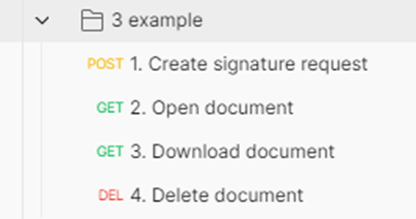
Figure 18 Single round signature with send info
Figure 19 Postman example 3

Updated on 25/07/2024
4.2 Example 2: One-round signing with redirect url4.4 Example 4: Multi-Round Signing
  • Documentation
    • Web App – OKdokument API
    • Signatus Mobile App
  • Contact Us
Proudly powered by WordPress