Description
This is the simplest implementation of the API services. On the side of the portal only the necessary services and signing configuration are used. We recommend to use it when getting familiar with the API services and testing the integration between Portal and OK API document.
How it works
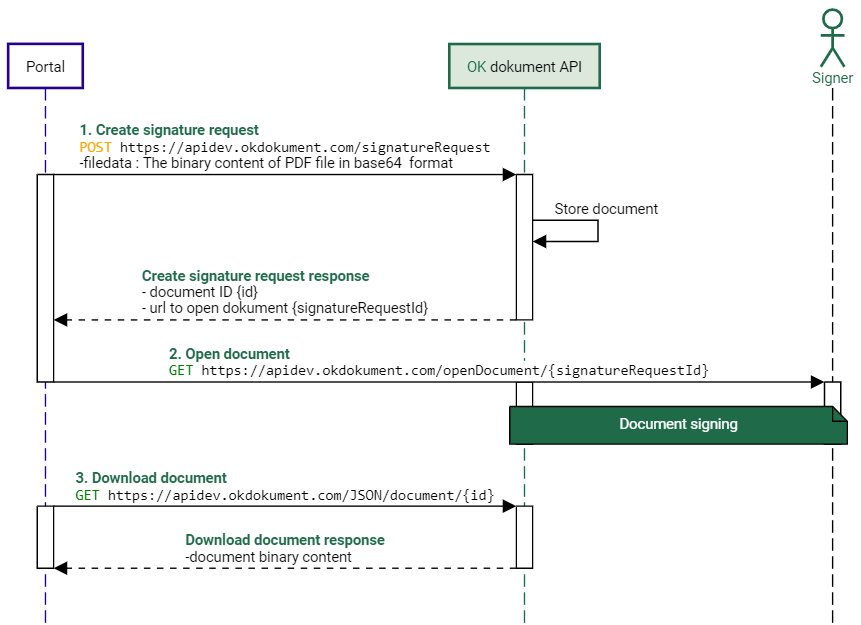
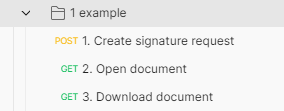
For quick testing and familiarization with the API services, it is enough to implement only 3 services, without additional parameter setting:
With the Create signature request, a PDF in base64 format is sent to the service, which does not have any signature fields specified (neither with a tag nor a signature acrofield). The default setting of the OKdokument API is the use of signing with signAnywhere, the default validity of the signature request is for signature is 24 hours from its creation (it can be change by setting parameter expirationTime).
Once signature request is created successfully, OKdokument API returns:
- Unique document ID
- The URL of the document
By opening the URL of the document (which is part of the Portal), the document is displayed in the signer’s web browser. By signing and confirming the document, its status changes to
“signed”. After signing the document, the signer is redirected to the static OKdokument API page. The signed document can be downloaded and saved in the Portal using the Download document service.
The signed document is automatically deleted after 10 days from the date of signature.